UGC practice briefs: 10 to film before your first brand deal
Every platform asks a new UGC creator for samples, and nobody has hired you yet. Here are ten practice briefs to film at home this week, what the platforms really ask for, and the Skill Challenges we are building so the practice counts.
On this page
Every UGC platform asks a new creator the same question: can we see your work? And every new creator has the same answer. What work? Nobody has hired me yet.
Designers had this problem years ago and fixed it with the practice brief, also called a mock brief or a spec brief: a made-up job with real rules, done for no client and kept for the portfolio. Whole sites hand them out. Briefbox sells itself on “practice briefs, design challenges” and a community of 15,000 creatives. FakeClients invents pretend clients for you to design logos for.
UGC has nothing like that yet. So if you are building a UGC portfolio with no experience, here are ten practice briefs you can film this week with a phone, a window and things you already own. After them: what platforms really ask a beginner for, four ways to ruin a practice video, and the Skill Challenges we are building at UGCOVE so that the practice counts for something.
The short answer
A UGC practice brief is a brief you write for yourself and then obey: one product, one skill, a length and a deadline. Nobody pays you. The video still goes in your portfolio.
- You do not need a brand deal to have samples. None of the creator sign-up pages we read asks whether a sample was paid work. Ours says outright that it need not be.
- Three good videos is enough to start. Published advice on portfolio size runs from three videos to twelve. The table is below.
- One skill per brief. Light, then the hook, then sound. Trying to fix everything in one video is how the video never gets finished.
- Use what you own. A product you bought and have opinions about beats a product you are pretending to like.
Do practice videos count in a UGC portfolio?
Yes. A brand that hires a UGC creator runs the video from its own account, or as an ad. It is buying how you film, not who follows you. So a sample has one job: to show that you can make a product look worth having in 15 seconds. A video about a face wash you paid for does that job as well as one a brand paid for.
Here is what a new creator is asked to send, according to each platform's own help pages in November 2026.
| Platform | What a new creator sends | The small print |
|---|---|---|
| Billo | A video pitch introducing yourself, exactly 30 seconds long | Creators in the US, UK and Canada only. No AI voiceovers. |
| Insense (the UGC-only route) | A portfolio of 6 to 12 videos | At least two product categories. No filters or watermarks. |
| Twirl | A portfolio link that works and is public | Its vetting lead: “We're not focused on your following, we're looking at your skill set.” |
| JoinBrands | A certification for each type of content, before applying to jobs | It has to be your own work |
| soona UGC (formerly Trend) | Examples of your UGC | US creators only, and an iPhone |
| UGCOVE | Links to three sample videos | No follower minimum. Samples need not be paid work. |
Nobody on that list asks to see an invoice. What they want is proof that you can film, and where the proof came from is your business.
How many videos does a beginner UGC portfolio need?
It depends who you ask.
| Who says it | How many | Which kinds |
|---|---|---|
| Elev8or (October 2026) | 3 | An unboxing, a testimonial and a problem-solution video, with products you already own |
| Billo (September 2026) | 3 to 5 | Sample videos, made “before you apply anywhere” |
| Twirl (January 2026) | 8 to 10 | Mostly voiceover ads, talking to camera, testimonials and problem-solution stories |
| JoinBrands (July 2026) | 8 to 12 | Four hook-based demos, two or three testimonials, one or two comparisons |
Every name in these two tables has something to sell to creators or to brands, us included, so read the numbers as opinions. Our reading: three videos is enough to apply somewhere this week, and eight is a portfolio you can stop apologising for. The ten briefs below get you past both.
What you need to film a practice brief
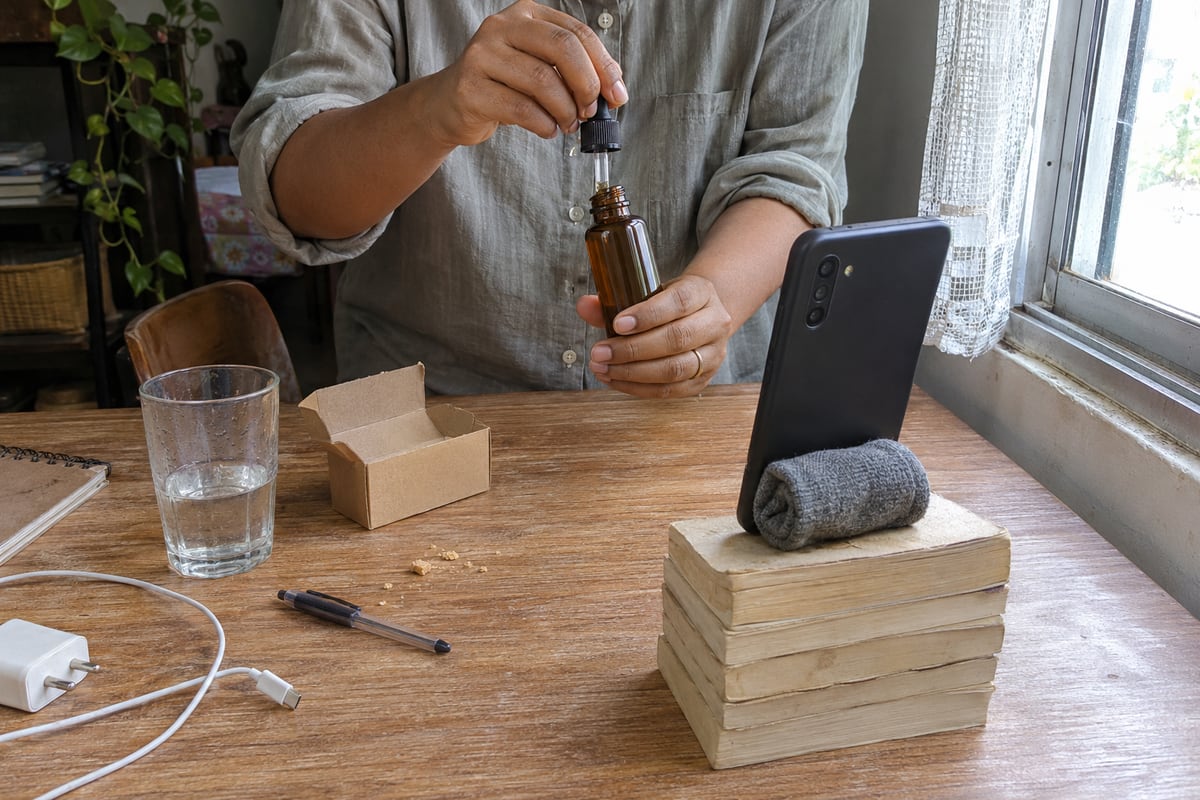
A phone, a window and a quiet room. That is the whole kit list, and it is the same one we give creators who apply to us.
You do not have to take our word for it. YouTube's own filming advice says “try recording outside or using natural daylight through a window”, and that “good sound is a must”. TikTok's guidance for advertisers asks for vertical video, shot in at least 720p, and tells brands to “go for a DIY or not overly polished style”.
The company that sells the ads is telling brands that polish works against them. Your bedroom is not a handicap. It is the look they are paying for.
How to run a practice brief
The point of a practice brief is the brief. Film something nice and you have got better at filming. Write the rules down first, then keep to them, and you have rehearsed the job.
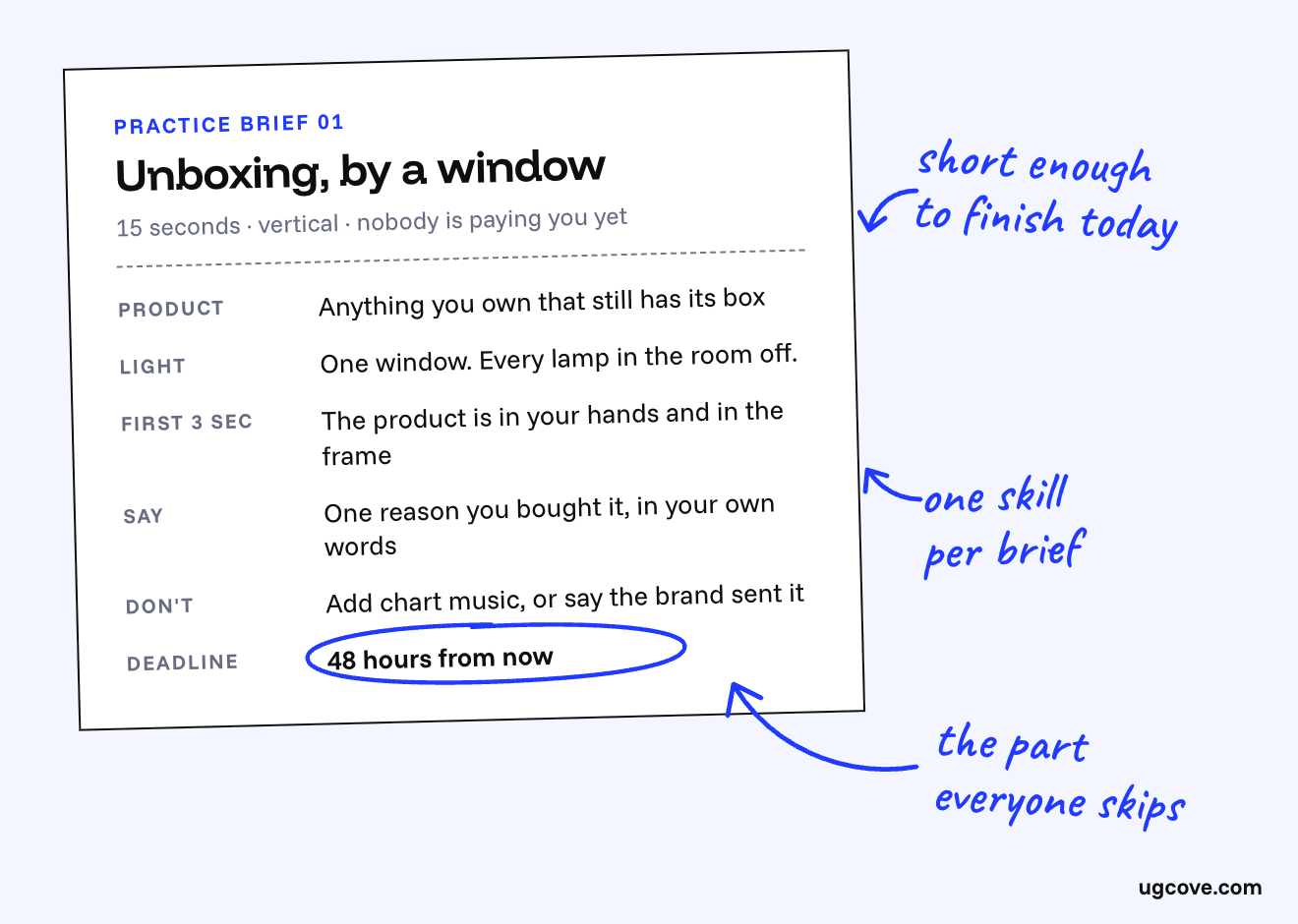
- Write it down before you film. The product, the length, the one thing that must be shown, the one thing that must be said, and what is not allowed.
- Give it a deadline. 48 hours is plenty. A real brief has one, and “when I get round to it” is how a sample stays in your head for a month.
- One skill per brief. If the brief is about light, do not also agonise over the script.
- Allow yourself two rounds of changes. Watch it the next morning, once with the sound on and once with it off. Fix what bothers you, twice at most, then stop. Two rounds is also what every UGCOVE brief includes, so you may as well get used to the number.
- Keep the file clean. No app watermark, no filter, no chart music. More on that further down.
10 UGC practice briefs to film this week
Each brief is one line you could paste into a note. The table is the short version. Below it, each brief gets the skill it trains and what a brand is looking at when it watches.
| The brief | Length | The skill |
|---|---|---|
| 1. An unboxing, using natural light only | 15 sec | Light |
| 2. The same opening, filmed three ways | 3 x 5 sec | Hooks |
| 3. A testimonial to camera, no script | 20 sec | Delivery |
| 4. A demo with no talking: hands and captions | 15 sec | Showing |
| 5. The problem first, then the product | 25 sec | Story |
| 6. Five shots with a voiceover | 15 sec | B-roll |
| 7. The same line in three rooms | 3 x 10 sec | Sound |
| 8. A before and after, same angle and light | 20 sec | Honesty |
| 9. A how-to in exactly three steps | 30 sec | Pace |
| 10. A brief somebody else wrote for you | Their call | Taking notes |
1. The window unboxing
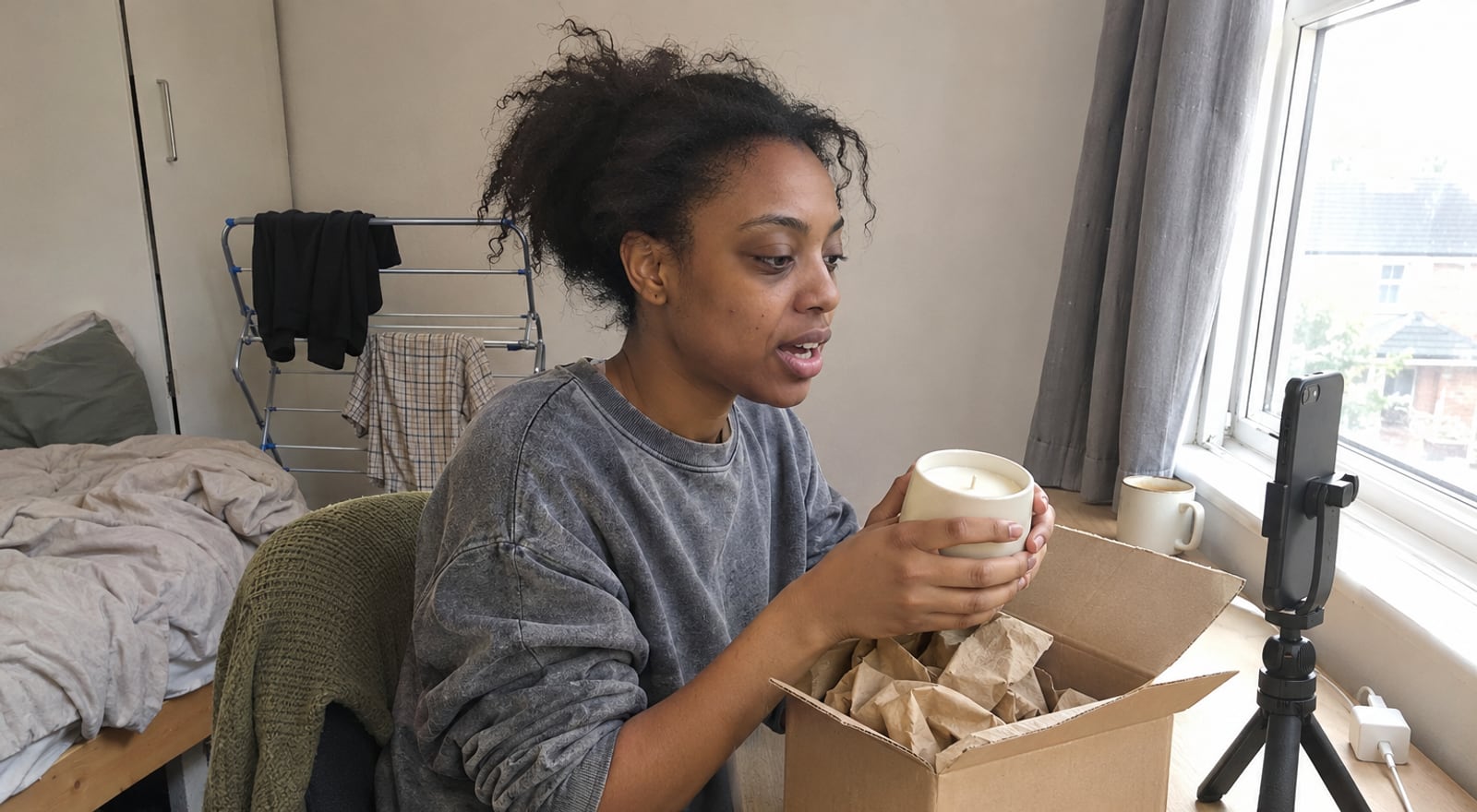
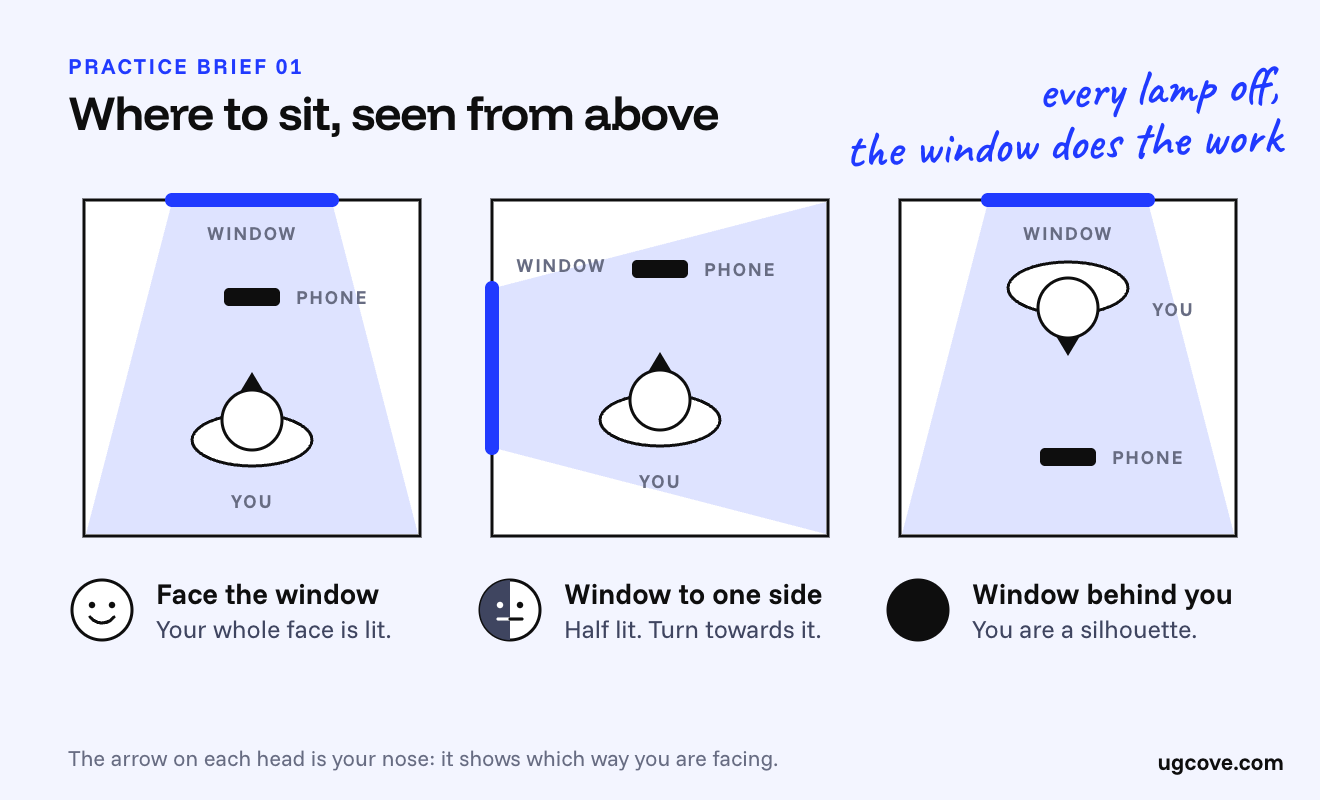
Film a 15-second unboxing using natural light. Sit facing a window, turn off every lamp in the room, and open something that still has its box. A brand is checking one thing here: can it see the product and your face without squinting? If the window is behind you, you are a silhouette holding a rumour. This is the first Skill Challenge on our list, for a reason.
2. Three hooks, one product
Film the first five seconds of a video three different ways: a question, a complaint and a result. TikTok tells advertisers to “introduce your content proposition in the first 3 seconds” and to “prioritize your hook in the first 6 seconds”. Brands pay extra for alternative openings so they can test which one works, as we found when we added up what a UGC video really costs. A creator who turns up with three is easier to hire.
3. The one-breath testimonial
Talk to the camera for 20 seconds about something you have used for at least a month. What annoyed you before, and what changed. No script, because reading has a sound and everybody knows it. Say it four times and keep the take where you forgot you were being filmed.
4. The no-talking demo
Show how the product is used in 15 seconds, with your hands and on-screen text only. TikTok's guidance says to “use captions or text overlays to provide context”. This brief makes you prove the product with pictures. If the video makes no sense with the sound off, the pictures were not doing enough.
5. Problem first
Make a 25-second video where the product does not appear for the first ten. Show the annoyance: the tangled cable, the leaking bottle, the pan everything sticks to. Then the fix. Most ads are this shape, and it is harder than it looks to wait ten seconds before showing the thing you are meant to be showing.
6. Voiceover and five shots
Film five three-second shots of the product in use, then record your voice over them. No face needed. This is b-roll, the footage that plays while someone talks, and it is the format to learn if you hate being on camera. Brands are checking whether the shots are steady and whether each one shows something new.
7. The sound check
Record the same ten-second line in three rooms of your home, and keep the best. Then listen on headphones. You will hear the fridge, the road and the echo off the bathroom tiles. Google tells advertisers that sound in a Shorts ad “has been shown to increase conversions by over 20%”, so a brand cannot do much with a sample it has to mute.
8. The honest before and after
Film a before and an after from the same angle, in the same light, in 20 seconds. A stain, a messy desk, a dry patch of skin. The skill is restraint. A brand has to trust that the second shot is the product working and not just the lamp being switched on.
9. Three steps
Make a 30-second how-to in exactly three steps, with the numbers on screen. Not four. Cutting a routine down to three steps forces you to decide what matters, which is most of editing.
10. Somebody else's brief
Ask a friend to pick the product, the length and the deadline, then to send you two notes on your first cut. This one is the nearest to the real job. Filming is the easy half. Following a brief you did not write and taking notes without sulking are what get a creator hired a second time.
Four ways to ruin a practice video
Pretending a brand hired you. You do not need to. The FTC's guide for influencers in the US says that if you “have no brand relationship and are just telling people about a product you bought and happen to like, you don't need to declare that you don't have a brand relationship.” So no #ad, no paid partnership label and no thanking the brand for sending it. Rules differ from country to country, so check your own. In your portfolio, call it practice or spec work. A brand will not mind that nobody paid for it. It will mind being misled.
Chart music. TikTok says the songs in its general library “are not pre-cleared for commercial content”. A brand cannot run an ad with a song it has no licence for, so a sample built around one is a video it could never use. Leave the music off, or pick from TikTok's Commercial Music Library, which is cleared.
Filters and watermarks. Insense's rules for portfolios put it in four words: “No filters or watermarks.” Export from your editing app without its logo on the end, and leave your face the way it is.
Ten videos of the same thing. Insense also asks for at least two product categories. Ten skincare unboxings show one skill ten times. Film a kitchen thing and a tech thing as well.
UGCOVE Skill Challenges: practice that counts
Most platforms do reward their good creators. The catch is when. Billo's Premium level starts after brands have approved 14 of your videos. JoinBrands moves you up to Level 2 after five jobs and an average rating of 4.0. When TikTok launched its Creative Challenge in 2023, where creators submit video ads to brand challenges, it asked for a US account with at least 50,000 followers.
All of that rewards people who have already been hired. It is no help with the first job.
So we are building ours the other way round. A UGCOVE Skill Challenge is a practice brief set by us, not by a brand. Each one asks for one style of video and tests one skill. The first on our list is the one at the top of this post: film a 15-second unboxing using natural light.
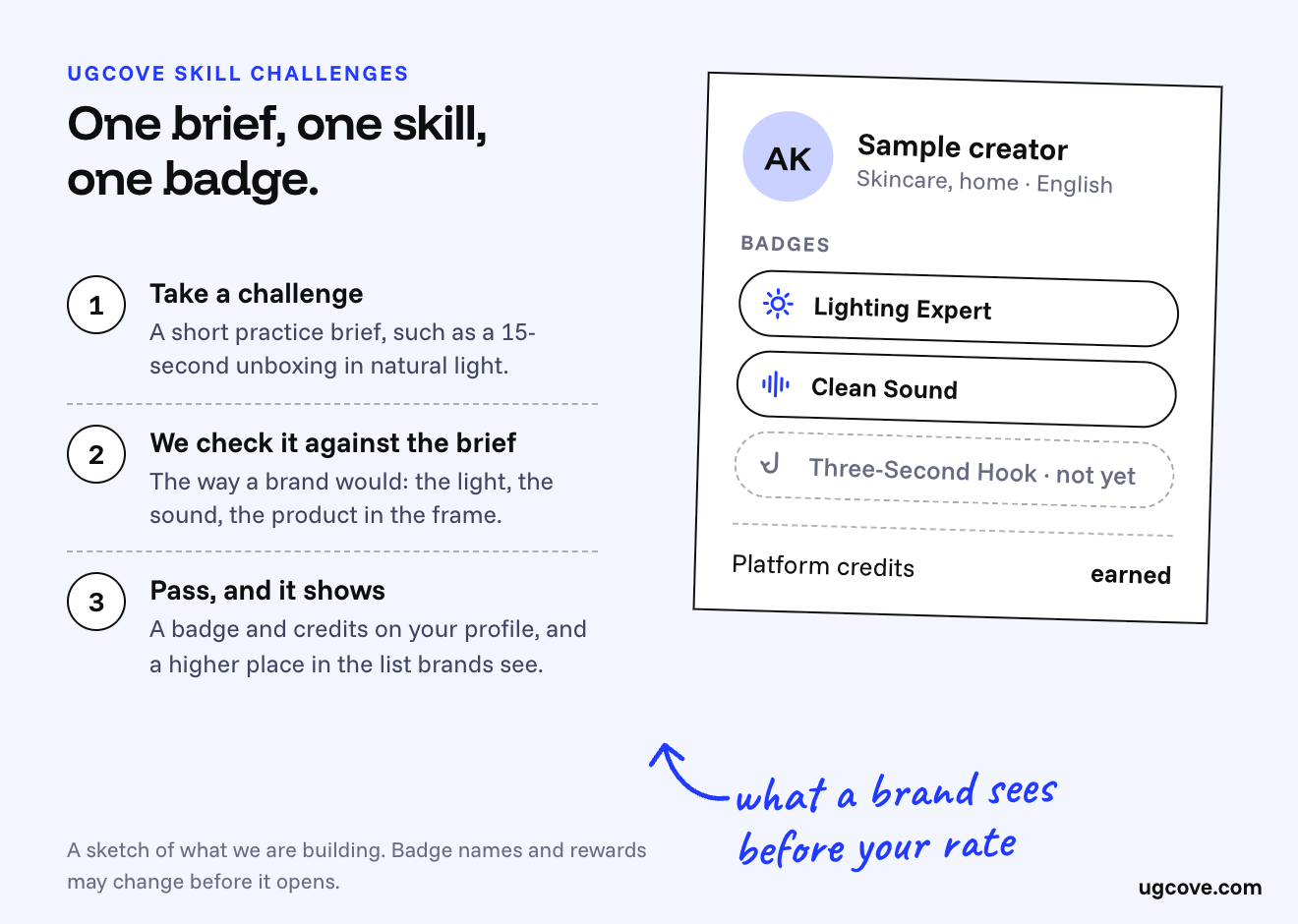
Pass a challenge and three things are planned.
- A badge on your profile. Pass the lighting challenge and your profile would say Lighting Expert. A brand skimming profiles would see what you are good at before it gets to your rate.
- Platform credits. Credits on your UGCOVE account for each challenge you pass.
- A higher place in the list. When paying brands join and start looking for creators, we plan to show the people who have passed challenges first.
That last one is the point. On day one of a new marketplace nobody has reviews, so brands pick more or less at random. We would rather the top of the list went to people who had already filmed something.
None of this is live yet. UGCOVE is not open, and the badge names and rewards may change before the first challenge runs. Creators on the waitlist will hear about it first.
From practice videos to your first application
Pick your best three, and make them three different kinds: say the unboxing, the testimonial and the problem-first video. Put the strongest one first. Nobody watches a portfolio to the end.
What is waiting at the other end? Billo says entry-level creators with a handful of finished samples “typically earn in the $50 to $150 range per video”. JoinBrands' blog puts complete beginners at $150 to $250. Neither says how it got its number, so treat them as a rough idea and not a promise.
On UGCOVE you set your own rate, and there is no follower minimum. Applying takes about three minutes and links to three sample videos, which you now know how to make. A person on our team watches every set.
FAQ: UGC practice briefs
What is a UGC practice brief?
A brief you set yourself, written like a real one: a product, a length, what must be shown and said, and a deadline. You film it unpaid, with a product you own, to build sample videos. Some people call it a mock brief or spec work.
Can I use practice videos in my UGC portfolio?
Yes. None of the platform sign-up pages we read asks whether a sample was paid work, and UGCOVE's says that any three videos you filmed yourself will do. Just do not present a practice video as a brand deal.
How many videos should a beginner UGC portfolio have?
Published advice runs from three (Elev8or, Billo) to twelve (JoinBrands). Three is enough to apply. Aim for eight, across at least two product categories.
Do I have to label a practice video as an ad?
In the US, no: the FTC says you do not need a disclosure when you have no relationship with the brand and are talking about a product you bought. Do not add a paid partnership label either, because there is no partnership. Other countries have their own rules.
Can I use a real brand's product in a practice video?
Yes. It is something you bought, and you are saying what you think of it. Do not suggest that the brand hired you or approved the video.
What is a UGCOVE Skill Challenge?
A practice brief set by UGCOVE that tests one skill, such as filming in natural light. The plan is that passing one earns a profile badge, platform credits and a higher place in the list brands see. It is not live yet.
The pages quoted in this post were read on 18 November 2026. We will update it when they change, and when the first Skill Challenge opens.