How to brief a UGC creator (and what to put on the page)
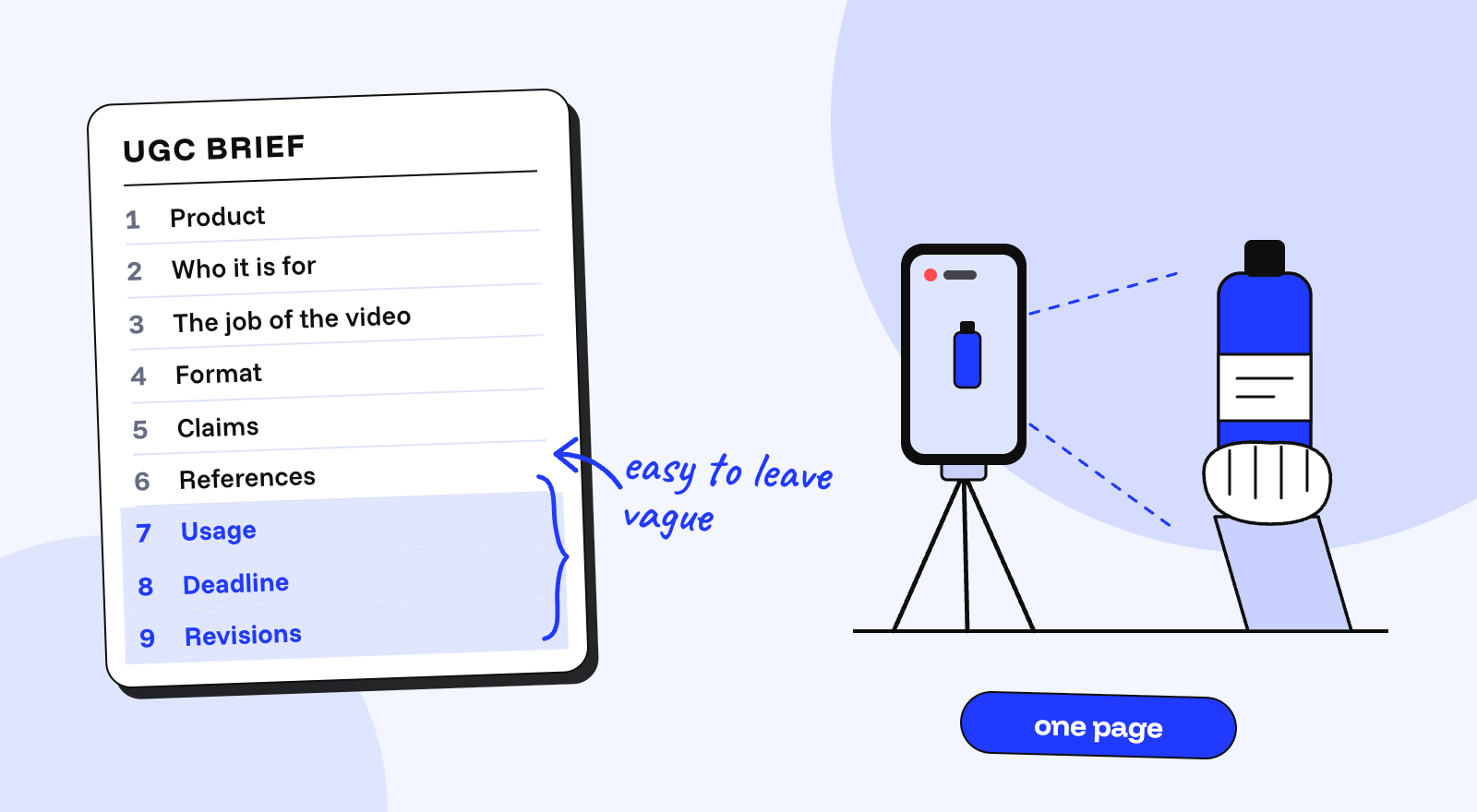
A good UGC brief fits on one page and answers nine questions before anyone films. Three of them are easy to leave vague: what you may do with the video, when the deadline starts counting, and what counts as a revision. Here is each line, and a template to copy.
On this page
A UGC creator films a short video about your product, and you run it from your own accounts or as an ad. The brief is the page that tells them what you are paying for. If something is not on that page, you should not expect to see it in the video.
Most brief templates cover the product, the tone and a list of talking points. Many say much less about three things: where and for how long you may use the video, when the deadline starts counting, and what counts as a change. This guide puts all of it on one page, as lines you fill in. It has the nine lines, the reason for each one, and a template you can copy.
The short answer
- Keep it to one page, and give the video one job. A brief that asks for awareness, sales and a full product demo in 30 seconds gets a video that does none of them well.
- Write talking points, not a script. TikTok's own advice to brands is: “DON'T use prescriptive language. Let creators speak in their own words.”
- List what the creator may say and what they may not. In the US, the UK and India, the brand carries responsibility for a claim its paid creator makes.
- Put the usage in the brief. Platforms, countries, period, and organic or paid use. Leave it out and you may have no right to post the video at all.
- Say when the clock starts and what a revision is. Billo, Insense, JoinBrands and Twirl all limit changes to what the original brief asked for.
What a UGC brief is for
A brief is not a mood board, and it is not a brand book. On a marketplace it is the agreement in miniature: what will be made, what may be said, where the video will run, by when, and how many times you can ask for changes. Billo's terms say this outright about its own orders: “The applicable Order details – including specifications, performance parameters, deadlines, compensation, and any additional instructions – constitute the full terms of such contract.”
UGCOVE is set up the same way. The brief is the agreement between you and the creator, and it reaches them exactly as you wrote it. A line you leave out is a decision you have handed to somebody else.
It follows that the brief has to live in one place. Billo's help centre warns brands about instructions sent later: “If the brief, script, or key requirements are provided outside of the brief (e.g., in chat or a separate document), Billo cannot guarantee that the script will be followed or that reshoot/edit requests will be honored.”
If you make the videos, not the briefs, our ten practice briefs show the same page from the creator's side.
Before you write: give the video one job
Decide where the video will run and the one thing it has to do there. A video that opens a cold ad on Reels has a different job from a video that sits on a product page and answers a doubt about sizing. Write the job as one sentence that starts with a verb, such as “Show a first-time buyer that the sunscreen leaves no white cast.”
If you have two jobs, order two videos, or ask for two openings on one video and test them against each other. We would not try to fit both jobs into one cut.
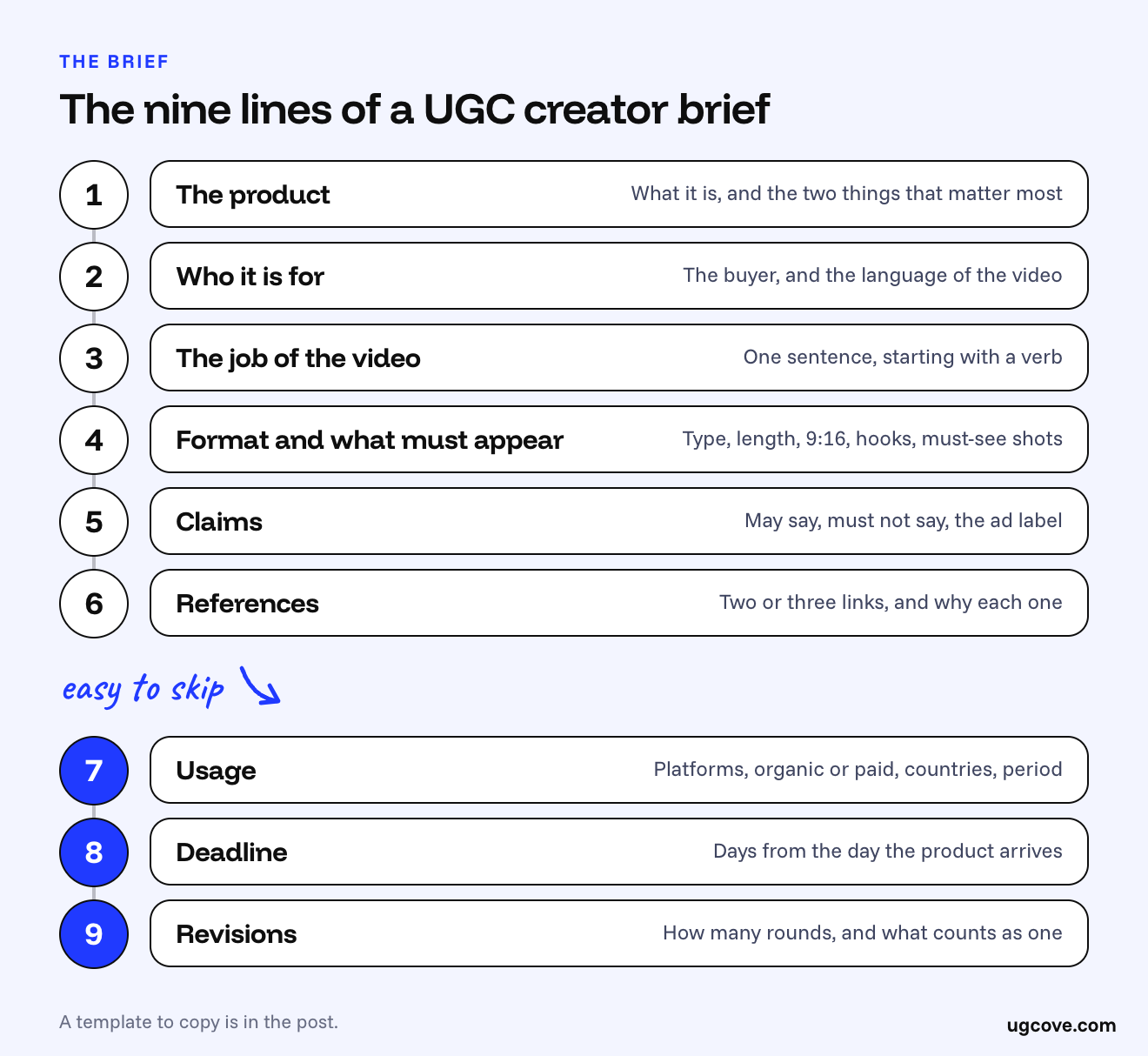
The nine lines of a UGC creator brief
Each line below is one field on the page. A few words are enough for most of them.
1. The product
Name it, say what it is in one sentence, and give the one or two things about it that matter most to a buyer. Add the link to the product page, and say how to pronounce the brand name if there is any doubt. Leave the company history out. TikTok's advice to brands is “DO share enough information so the creator seems knowledgeable.” That is a good test: could the creator answer a friend's question about the product?
2. Who it is for, and in which language
Describe the buyer the way you would describe a person: what they do, what annoys them, what they have already tried. Then name the language you want the video in. You can write the brief in English and ask for the video in Hindi, Thai or Spanish, and a creator who speaks the language will say it in the words a customer would use. If the video needs captions or on-screen text in a second language, say so here.
3. The job of the video
This is the one sentence from the step above. Add where the video will run first, for example as a Reels ad, on TikTok or on a product page, because that decides the length and the opening.
4. The format, and what must appear on camera
Say what kind of video you want: an honest review, an unboxing, a tutorial, a get-ready-with-me. Give the length and the shape. For Reels, TikTok and Shorts that means vertical. Google's help page for Shorts ads says: “Vertical videos, with a 9:16 aspect ratio, are best suited for the Shorts format and deliver better performance compared to landscape assets.”
Then list what has to be seen: the label facing the camera, the product in use, the texture, the box being opened. Three to five things are enough. If you want more than one opening to test, give the number of hooks here (our post on the first three seconds explains why they matter), and say whether you want captions burned in and the raw clips as well.
One technical line saves a lot of re-editing: keep faces, captions and the product clear of the app's buttons. Meta's ad specifications for Reels put it in numbers: “Consider leaving at least 14% of the top, 35% of the bottom and 6% on each side of your asset free from text, logos or other important creative elements.” That is a recommendation for one app, and other apps may cover other parts of the frame, so tell the creator which app the ad is for.
5. What the creator may say, and what they may not
This is the line that protects you. Write two short lists. The first has the claims you can prove, such as “SPF 50”, “dermatologist tested” or “ships in two days”. The second has what must not be said: that the product treats a condition, a comparison with a named competitor, a result you cannot show.
The reason is that the claim is yours, even when the creator is the one saying it. In the United States, the FTC's Endorsement Guides state: “An advertiser may be liable for a deceptive endorsement even when the endorser is not liable.” The FTC's guidance for businesses tells them to explain to the people they pay “what they can (and can’t) say about the products – for example, a list of the health claims they can make for your products, along with instructions not to go beyond those claims”.
The UK's advertising code says marketers “must hold documentary evidence to prove claims that consumers are likely to regard as objective” before an ad goes out. In India, ASCI's guidelines for influencer advertising put the responsibility for the content “upon the advertiser for whose product or service the advertisement is, and also upon the influencer.” The detail differs from country to country, so check the rules where your ad will run. This post is not legal advice.
Add one more sentence to this line: the video will be labelled as an ad wherever the rules require it. And leave room for the creator to refuse a line they cannot say honestly. In the FTC's words, endorsements must reflect “the honest opinions, findings, beliefs, or experience of the endorser.”
6. References
Link two videos, or three, and say in one sentence why each is there: the pace of this one, the opening of that one, the light in the third. A reference with no reason attached tends to get copied whole. If there is something you have seen and do not want, one example of it is worth a paragraph of description.
7. Usage: where, how and for how long
On UGCOVE the creator keeps ownership of the video and gives you permission to use it. That is also the usual starting point in the US, the UK and Singapore, though not everywhere. That permission is the usage licence, and it has four parts.
- Platforms. Name each one: Instagram, Facebook, TikTok, YouTube, your website, your emails.
- Organic or paid. Posting on your own account is one thing. Putting ad spend behind the video is another, and creators may price the two differently.
- Countries. Where the video will be shown.
- Period. Three months, six or twelve, and the day it starts counting.
Say too whether you want to run ads from the creator's own handle, which TikTok calls Spark Ads and Meta calls partnership ads. That needs the creator's permission inside the app, on top of the licence, so it has to be asked for before they accept the job.
Do not leave this line for later. Collabstr's terms show what silence can cost. If an order does not provide for content rights, the brand receives “a limited, non-exclusive license to use the Content Deliverables solely for the purpose of approving the Content Deliverables in the Order”. In plain words, you may watch the video and do nothing else with it. TikTok's own form for hiring creators has a step for choosing an “Ad authorization period”.
8. The deadline, and when it starts counting
A date is not enough if the creator is waiting for a parcel. Write the deadline as a number of days from the day the product arrives, and say whether the changes you ask for have to fit inside that time. On UGCOVE the default is 10 days from arrival, with the two rounds of changes inside the 10 days, unless your brief sets another deadline. A late courier moves the deadline with it. Say too whether the creator keeps the product or sends it back.
Add your own clock as well: how quickly you will reply to a delivery. Marketplaces set one for brands, so that a creator is not left waiting for ever. Collabstr's review period is 72 hours, Twirl asks brands to review content “within 7 days of delivery”, and on UGCOVE a delivery with no reply for 5 days counts as approved.
9. Revisions: how many, and what counts as one
State the number of rounds. There is no single standard. Billo allows “up to 2 requests per piece of content”, Insense “up to 3 revisions”, TikTok One “up to 5 edit requests”, and JoinBrands between 1 and 10, depending on the plan the brand pays for. UGCOVE includes two rounds in every brief.
Where a marketplace spells out the limit, it is the same one. A revision corrects the video against the brief. It does not add to the brief. Insense says revisions “should always be in line with the requirements set out in the original brief”, and JoinBrands says: “New requests outside the job details are optional.” Our own terms put it in seven words: a new requirement is a new order.
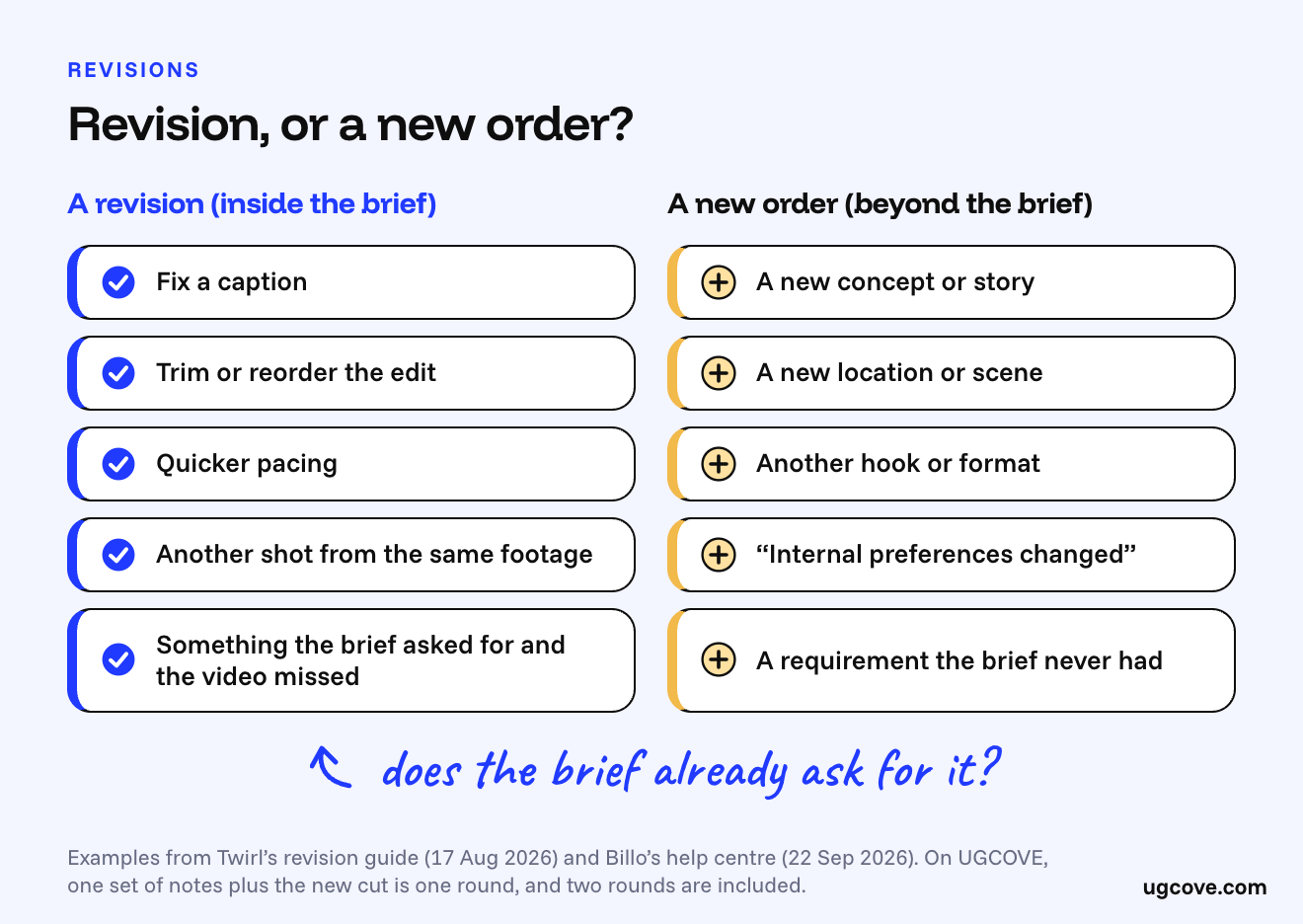
Twirl, a UK UGC platform, gives a test we like: “Asking for quicker pacing improves the execution. Asking for a different story changes the creative direction.” If the only way to get what you want is to film again somewhere new, it is a new order.
Talking points, not a script
Brands script creators because a script feels safe. The platforms advise against it. TikTok tells brands: “DON'T use prescriptive language. Let creators speak in their own words. Viewers can tell if someone else wrote the lines for them, and it takes away from the authenticity of a video.” Google's guidance for Shorts ads says it more briefly: “Leverage authentic creator assets when you can.”
That does not mean a blank page. The same TikTok article asks brands to share enough for the creator to sound informed, and to put long calls to action in the caption. A workable middle is three talking points in your own words, the claims list from line 5, and the opening line left to the creator, with two or three hook ideas if you have them. Our post on editing a video so it feels native shows what that freedom buys you in the cut.
A second TikTok article, built on interviews with two creators, makes the point from the other side. Once a brand and a creator have agreed on “scripting, timeline, structure, and tone, they should stick to it as much as possible.” Freedom at the start, and no surprises afterwards, is the bargain.
We should be straight about the evidence. We could not find an independent study that compares tightly scripted creator videos with loosely briefed ones, or one that counts how many revision rounds a typical job takes. Some platforms publish percentages on this without saying where they come from, and we have left those out. What you have read here is the platforms' own guidance and our reasoning.
A UGC brief template you can copy
Copy this into a document and fill in every line. Short answers are fine. If a line does not apply, write “none”, so the creator knows you thought about it.
UGC BRIEF

1. PRODUCT
Name and what it is:
The one or two things that matter most:
Product page link:
How to say the brand name:

2. WHO IT IS FOR
The buyer, in two sentences:
Language of the video:
Captions or on-screen text in:

3. THE JOB OF THE VIDEO
One sentence, starting with a verb:
Where it runs first:

4. FORMAT AND WHAT MUST APPEAR
Type (review, unboxing, tutorial...):
Length and shape (e.g. 30 seconds, 9:16):
Must be seen on camera (3 to 5 things):
Number of hooks:
Captions burned in? Raw clips?

5. CLAIMS
May say (only what we can prove):
Must not say:
Ad label: as the platform and local rules require

6. REFERENCES
Link 1, and why:
Link 2, and why:
Link 3, and why (optional):
One thing we do not want:

7. USAGE
Platforms:
Organic, paid ads, or both:
Ads from the creator's handle? (yes / no)
Countries:
Period, and when it starts:

8. DEADLINE
Final video due: __ days after the product arrives
Changes included in that time? (yes / no)
We reply to each delivery within: __ days
Product: creator keeps it / sends it back

9. REVISIONS
Rounds included:
A revision fixes the video against this brief.
A new requirement is a new order.
The same UGC brief, filled in
Here is the template filled in for a made-up product, so you can see how little writing it takes. The brand and the product are invented.
- Product. A cold brew coffee concentrate in a 500 ml bottle. One part concentrate to three parts water or milk. No added sugar.
- Who it is for. People who buy an iced coffee on the way to work and would like to stop paying for it. Video in English, captions in English.
- The job. Show a first-time buyer that a glass takes ten seconds to make. It runs first as a Reels ad.
- Format. Honest review, 30 seconds, 9:16. Must be seen: the label, the pour, the glass with ice, the first sip. Three hooks. Captions burned in, raw clips included.
- Claims. May say: no added sugar, and that an opened bottle keeps for two weeks in the fridge. Must not say: anything about health or weight, or any comparison with a named coffee chain. Labelled as an ad where the rules require it.
- References. Two links, one for its pace and one for the way it opens on the pour. Not wanted: a voiceover with no face.
- Usage. Instagram and Facebook, organic posts and paid ads, from the brand's account only. The United Kingdom and Ireland. Six months from approval.
- Deadline. 10 days after the product arrives, changes included. We reply to each delivery within 3 days. The creator keeps the product.
- Revisions. Two rounds. A new requirement is a new order.
A creator can read that in a minute. They know what to film, what not to say and what they are licensing, and they can set a rate that matches it.
Three checks before you send it
- Read it as the creator. Could you film it tomorrow without asking a single question?
- Check every claim against the label or your evidence. If you cannot prove it, take it out of the “may say” list.
- Check the usage line against your plans. If you might run the video as an ad in three months, ask for paid use now. Adding it later needs the creator's agreement, and a new price.
Where UGCOVE fits
A brief on UGCOVE covers the same ground: product, format, language, hooks, usage rights, deadline and revisions. You write it once, in your own words, and it reaches creators exactly as written. Creators who fit apply with their own rate, and they accept the usage rights, the deadline and the two rounds of changes before they film. Your payment is held until you approve the video, and a signed usage-rights document comes with the download. How it works has every step.
We are not open yet. We are opening to brands from anywhere in the world in small groups, and the waitlist hears about launch pricing first.
FAQ: briefing a UGC creator
How long should a UGC creator brief be?
One page. The template above fits on one. If yours runs to three, some of it is background the creator does not need.
Should a UGC brief include a script?
Talking points and a claims list, yes. A word-for-word script, usually not: TikTok's advice is to avoid “prescriptive language”. If one sentence has to be said exactly, such as a legal line, mark it as fixed and keep the script to that sentence.
How many revisions should a UGC brief include?
Platforms differ, from one round to ten on the pages we read. UGCOVE includes two. The number matters less than the rule that a revision stays inside the brief.
Are usage rights part of the brief or the contract?
Put them in the brief, so the creator sees them before setting a rate or accepting. A separate contract can repeat them. On UGCOVE the brief is the agreement, and the usage-rights document is issued from it.
Can one UGC brief cover TikTok and Meta ads?
Yes, if the usage line names both and the video is framed so that nothing important sits under either app's buttons. Running ads from the creator's handle is set up separately in each app, so ask for each one by name.
Who has to label the video as an ad?
Both sides have a part. The FTC tells brands to instruct the people they pay on “exactly how you want them to make the disclosures”, and the platforms have their own labels for paid content. Write the label you expect into line 5, and check the rules of the country where the video will be shown.
The pages quoted in this post were read on 27 November 2026. We will update it when they change.