The 3-second rule: editing techniques to keep viewers hooked
A stranger in a feed gives your video about three seconds. Here is what to put in them, how to cut the dead air and the ums out of the rest, and how to use jump cuts without wearing people out.
On this page
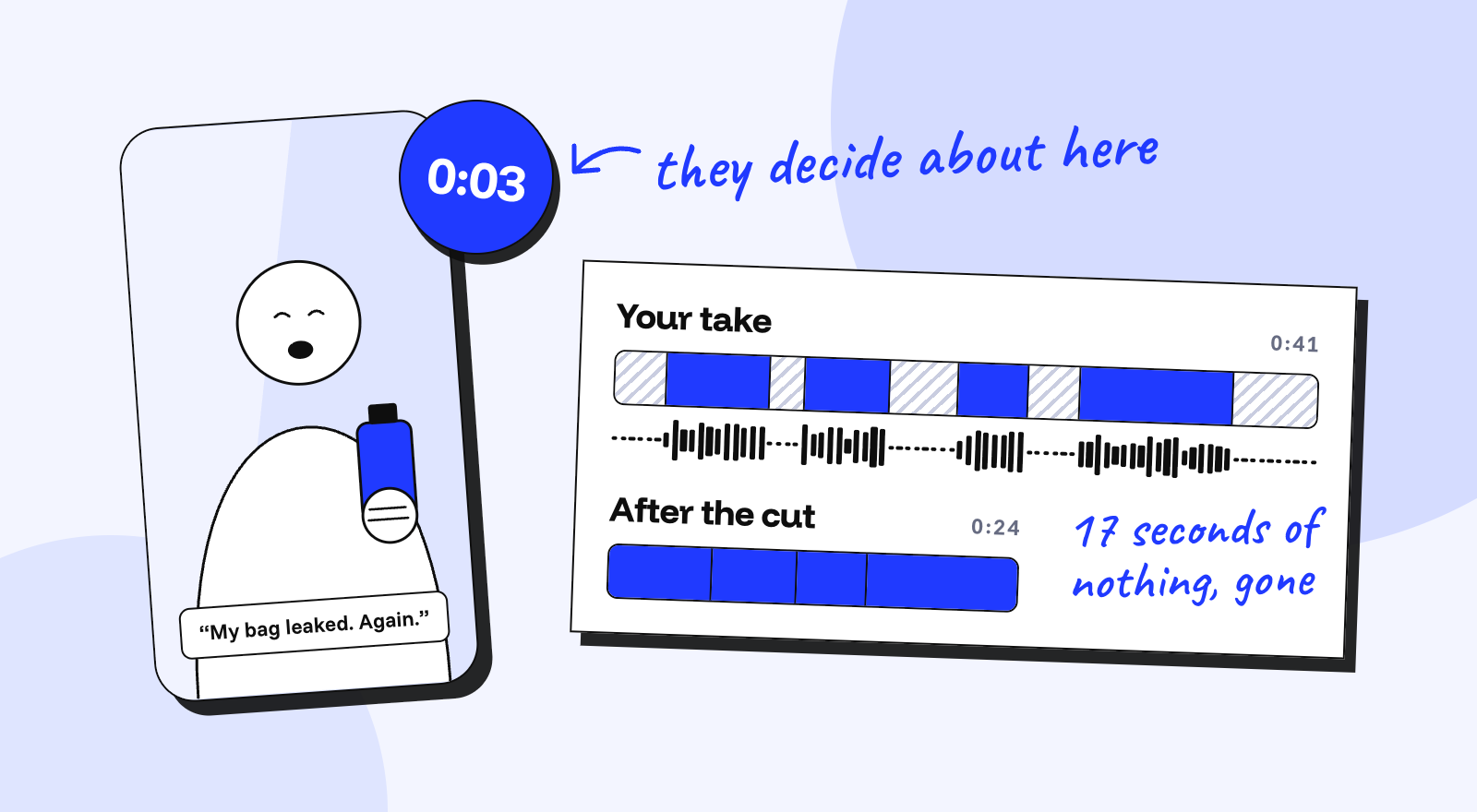
You filmed it by the window. The sound is clean. The video is 41 seconds long, and the first four of them are you saying “okay, so, um” while your hand comes back from the record button.
Hardly anyone is going to see second five. In a feed, a stranger did not choose your video. It turned up, and it gets about three seconds before the thumb moves. This post is about the edit: what to put in those three seconds, and how to cut everything after them so there is never a good moment to leave.
The short answer
- The 3-second rule: get the product or the problem on screen, and said out loud, inside the first three seconds.
- The number is not magic. It is where the platforms count. Meta has long reported 3-second video views, and its Instagram tools now report how many people skip a Reel in its first three.
- Cut the dead air. The start of every clip, the gaps between sentences, and the bit at the end where you reach for the phone.
- Cut most of the ums, not all of them. A person who never hesitates sounds like a voiceover.
- Use jump cuts on purpose. Every um you remove leaves one behind anyway. Zoom in a little on the next clip and it looks meant.
- Leave room to breathe. Fast is good. Breathless is tiring.
What is the 3-second rule in video?
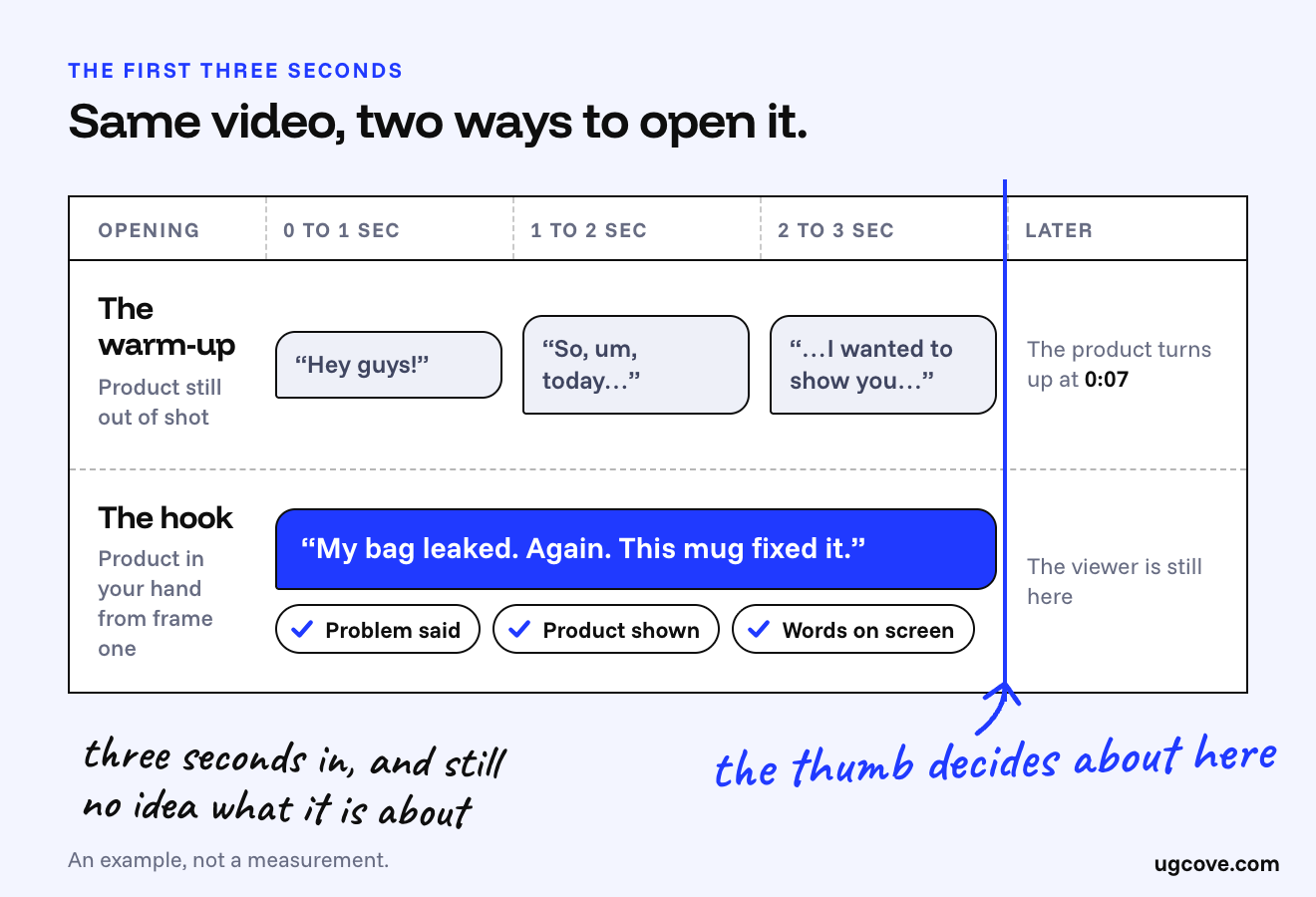
It is a rule of thumb, in every sense. The 3-second rule says a short video has about three seconds to give a stranger a reason to stay. So whatever the video is about has to be on screen, and said, before those seconds are up.
Nobody passed it into law. Three seconds is simply where the platforms do their counting.
- Meta has a metric for views where the video “played for at least 3 seconds”. A Facebook page for advertisers from about ten years ago, still online, says “65% of people who watch the first three seconds of a video will watch for at least ten seconds”.
- Instagram has a newer one. In December 2025 Meta added a skip rate to the Instagram data it gives to apps: “the percentage of views where viewers skip a Reel within the first 3 seconds”. Instagram's advice to creators is as plain: “Make sure the first 3 seconds of your reel are engaging, so that people don't move on.”
- TikTok tells advertisers, in its creative guidance, to “introduce your content proposition in the first 3 seconds for better recall and awareness”. Its ad reports count views at two seconds and at six.
- YouTube names no number. But its Shorts analytics show how often people “viewed your Shorts versus swiped away”, and Google's advice to advertisers is to “get to the heart of the story faster”.
So three is a round number, not a law of nature. TikTok counts at two and at six, and YouTube will not name a figure. All they agree on is that the decision comes early, and that somebody is counting.
It is also, we think, one of the first things a brand checks in your sample videos. We went through the rest of that list in what brands actually look for in a UGC creator.
How to hook viewers in the first 3 seconds
Most of this is done in the edit, not on the day. You almost certainly filmed a good opening line. It is just sitting at second nine.
Find your best sentence and move it to the front
Watch the take and listen for the line that would make a stranger look up. It is usually the complaint (“my bag leaked, again”) or the result (“I have not bought a coffee out since March”). Cut it out and put it first. Whatever came before it was you warming up.
Put the product or the problem in the first frame
Google tells advertisers to “introduce your brand or product from the start and maintain that presence”. For a UGC video, that means the product is in your hand when the video begins, and not rising from under the desk at second seven. If the video is about a problem, show the problem: the stain, the tangle, the dead phone.
Start in the middle of a movement
Trim the opening clip until the first frame is already moving: the lid coming off, the pour, your hand halfway up. A still face waiting to begin looks like a video that has not loaded. That one is our advice, not a platform's.
Put the words on screen
Not everyone has the sound on. That old Facebook page told advertisers that “most video ads in mobile feed are viewed without sound”, and TikTok says to “use captions or text overlays to provide context to your ad”. So type your opening line on the screen for the first three seconds. Keep it short enough to read in one glance.
Cut the hello
“Hey guys”. Your name. “So today”. Any sentence that begins “I just wanted to”. A stranger does not need an introduction to someone they are going to know for 20 seconds.
If you want to practise, the second of our ten practice briefs is exactly this: one product, three different openings.
How to cut dead air out of a video
Dead air is any stretch where nothing new is said and nothing new is shown. It is the easiest thing to fix, and we think it makes the most difference. Adobe's guide to jump cuts quotes a videographer, Nick Cann, on why: “People have little conversational fillers, or they'll pause to think for a second, and no one wants to watch that, so you can cut those parts out and speed up the video.”
It hides in three places.
- The front of every clip. The second where you press record and sit back. Every clip has one.
- The gaps between sentences. Where you looked at your notes, or wondered what came next.
- The tail. The “so… yeah”, the smile that goes on too long, the reach for the phone.
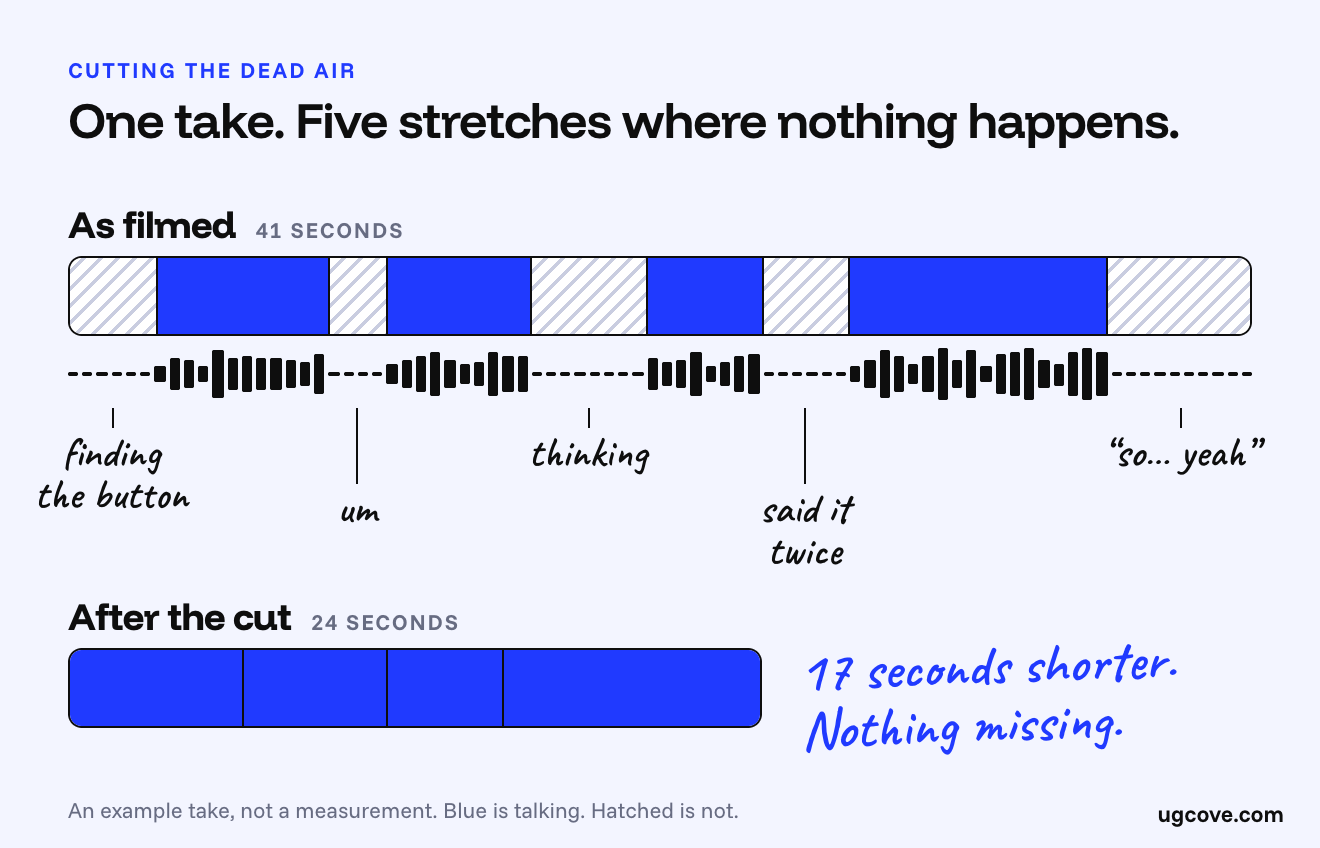
To find it, look at the sound. Most editing apps can draw the audio as a wavy line under the clip, though in some you have to switch it on. Where the line goes flat, nobody is talking. Cut from the flat part to a hair before the next bump. Leave that hair, or you clip the first sound of the word.
Two things to leave alone. The first is the small breath before a new point: cut it and you sound like you are being chased. The second is a pause where the product is doing something. If the cream is sinking in or the kettle is pouring, the picture is busy even though you are quiet. Dead air is when the sound and the picture both stop.
How to remove filler words from a video
Um, uh, like, so, basically, you know, to be honest. Everybody uses them, and nobody hears their own until the edit.
Our rule, and it is ours and not a platform's: cut the ones you notice on the second listen. Those are usually:
- The run-up. “So, um,” before the sentence proper. These come out cleanly, because there is a gap on either side.
- The restart. You began a sentence, stopped, and began it again. Keep the second go.
- The pile-up. “Like, basically, kind of”. Keep one of the three if you must.
Leave the ones buried in the middle of a fast sentence. Cutting those clips the words on either side, and a chopped word is worse than an um. And leave a couple in on purpose. Even TikTok tells its advertisers not to look too polished. A person who never hesitates sounds like an advert, and the brand came to you because it did not want one.
Tools that remove filler words and silences
You can do all of this by hand in any free editor, and for a 30-second video it does not take long. If you would rather a machine did it, here is what the makers say on their own pages. We have not tested these against each other, so it is a list and not a ranking.
- CapCut has a filler-word tool that says it can “detect and delete unnecessary pauses, ums, and ahs from speech in seconds”. Its page offers it on a free trial, so check what it costs after that.
- Descript has “Remove filler words” and “Shorten word gaps”, which it says will “automatically tighten long pauses”. Its help pages say both use AI credits on its current plans.
- YouTube Create and Instagram's Edits are phone editors that add captions for you. YouTube Create is free, and Edits is free with in-app purchases. Neither one's page mentions removing fillers or silences, so there you cut by hand.
Whichever you use, watch the result. A tool cuts wherever it finds a silence, and it will happily remove the pause that was holding your best line up.
What is a jump cut, and how do you use one?
Adobe's definition: “A jump cut in filmmaking is an edit to a single, sequential shot that makes the action appear to leap forward in time.” In plain words, you cut a piece out of the middle of one shot, and the person on screen jumps a little.
So if you have followed this post so far, you have already made a dozen. Every um you removed left one behind. Adobe says as much: “it's common for makers of talking-head videos to use jump cuts to skip awkward pauses or mistakes.” A well-placed jump cut reads as energy. A badly placed one reads as a glitch. Here is how to get the first kind.
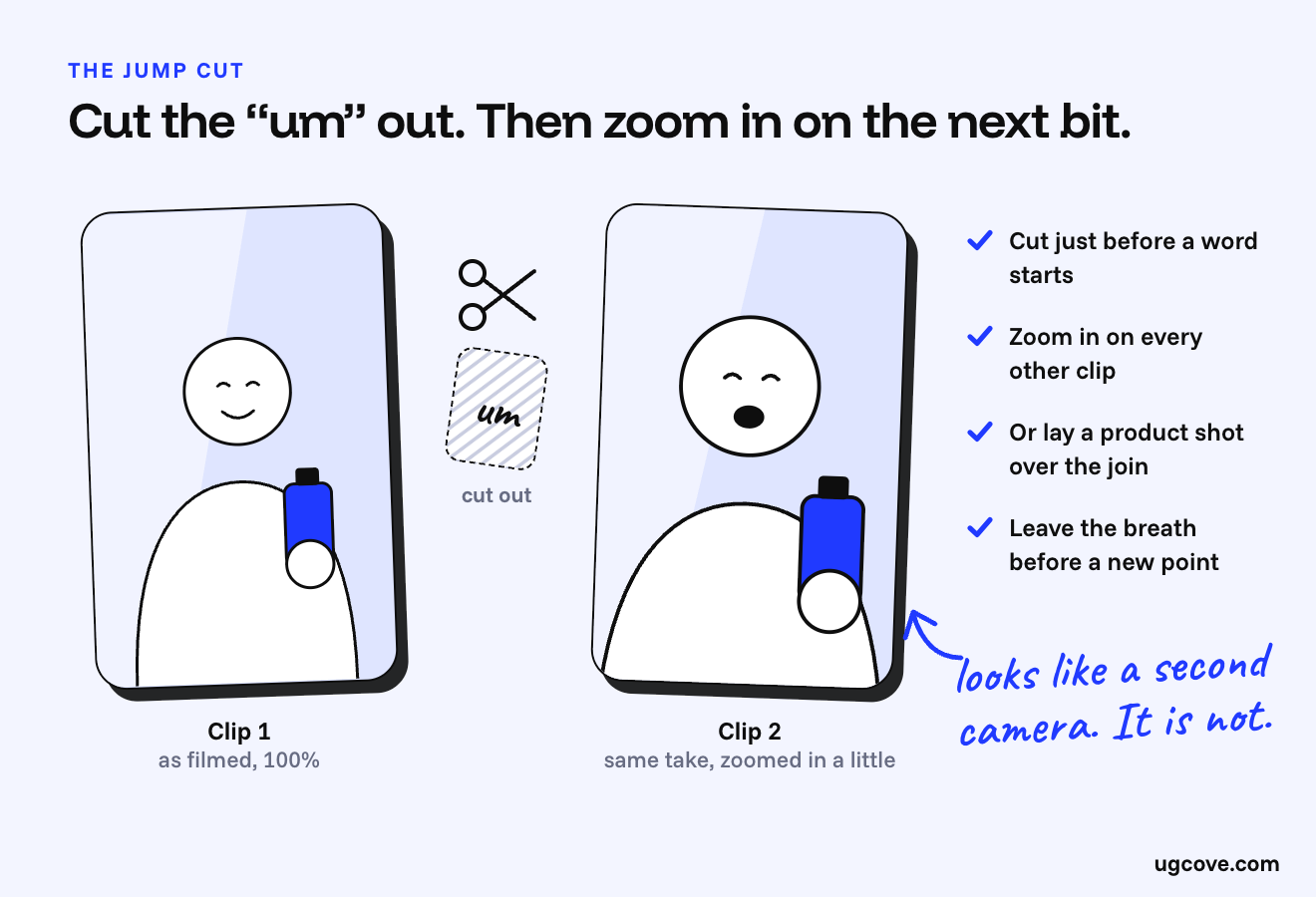
- Cut just before a word starts. Not in the middle of one, and not halfway through a breath. Leave a sliver of quiet in front of the word, or the join clicks.
- Zoom in on every other clip. Editors call this a punch-in. Scale the second clip up a little, so the jump looks like a change of camera and not a hiccup. We would try somewhere between 110 and 120 per cent. If the picture goes soft, zoom less.
- Cover the join. Lay a close shot of the product over the cut while your voice carries on, and the cut disappears. Those extra shots are called b-roll.
- Keep your head in roughly the same place. If you moved a long way between the two halves, the jump becomes a lurch. Zoom or cover that one.
- Change something every few seconds. TikTok tells advertisers to “utilize transitions, stickers, and graphics in your creative to retain engagement and view time”. We would go easy on the stickers. A closer shot, a new angle or a line of text does the same job.
Pacing: how fast is too fast?
Google asks advertisers for “engaging pacing and tight framing”. Fast is not the same as frantic. A video cut so hard that every sentence lands on top of the last one is tiring, and people leave those too.
Signs you have gone too far:
- Words with the first or last sound missing.
- The product is never on screen long enough to see what it is.
- Text that vanishes before you have finished reading it.
- You, the person who made it, feel slightly out of breath watching it back.
Good pacing has slow parts. Give the product one clear, unhurried moment when it first does its thing. Then pick the speed back up.
How long should the finished video be? As long as the brief says. If the brief does not say, ask. And if it really is up to you: as short as it can be with everything the brief asked for still in it. We could not find a platform page that gives one right length, so be wary of anyone who quotes you a magic number.
A simple editing order for a UGC video
- Watch the whole take once without touching anything. Note the best line, and the second where you got bored.
- Move the best line to the front. Then check the first three seconds. Is the product or the problem on screen, and has it been named?
- Trim the front and the tail of every clip.
- Cut the gaps. Flat line, gone.
- Cut the fillers you notice. Leave the rest.
- Fix the jumps. Zoom in on every other clip, or cover the join with a product shot.
- Add captions, and read them. Automatic captions make mistakes, and the product's name is the worst place for one.
- Watch it with the sound off. Then listen to it with your eyes shut.
- Export a clean file. Nothing stamped on the end by the editing app, and no song you do not have the rights to. Keep the raw clips as well, because some brands ask for them so they can make their own cuts.
Five editing mistakes that make people scroll
The logo intro. A title card, a swoosh, your name in a nice font. Those were your three seconds.
Transitions for their own sake. A spin between every clip tells the viewer an app made this.
Music louder than you. If the brand wanted a music video it would have said. Keep any music well under your voice, or leave it off and let the brand add its own.
Captions on top of the product. Or underneath the app's buttons. Our advice: keep text away from the very bottom of the frame and the right-hand edge, which is where the feed apps tend to put the caption and the like and share buttons.
Cutting every breath. We said it above, but it is the easiest way to overdo everything in this post.
If you are the brand: what to ask for and what to measure
- Put the hook in the brief. Say what has to be on screen in the first three seconds. Do not leave it to chance and then mark the video down for it.
- Ask for two or three openings. The opening is the part you will want to test. Expect to pay for them: extra hooks were a separate line on the bill when we added up what a UGC video really costs.
- Ask for the raw clips. Then you can recut the video for a different placement without a reshoot.
- Look at the early numbers. Meta reports 3-second video views, and TikTok reports 2-second and 6-second views. Divide by impressions and you have what advertisers call a hook rate or thumb-stop rate. Neither is a platform's own term, and we have not found a platform page that says what a good one is. Compare your own ads with each other.
FAQ: the 3-second rule and editing UGC videos
What is the 3-second rule in video?
It is a rule of thumb: a short video has about three seconds to give a stranger a reason to keep watching, so the product or the problem should be on screen and named by then. The number comes from where platforms count. Meta reports 3-second video views, and its Instagram data now includes how many people skip a Reel in its first three.
How do you hook viewers in the first 3 seconds?
Open on your strongest line, with the product or the problem already in the frame. Start mid-movement, put the opening words on screen for people watching without sound, and cut the greeting.
What is dead air in a video?
Any stretch where nothing new is said and nothing new is shown: the start of a clip before you speak, the gaps while you think, and the end before you stop recording. Cut it, but keep the small breath before a new point.
How do you remove filler words from a video?
By hand, cut at the gap on either side of the um. Or use a tool: CapCut and Descript both have features that find filler words and long pauses. Do not remove every one. A couple of ums left in sound like a person.
What is a jump cut?
A cut inside a single shot, so the picture jumps forward slightly. It is what is left when you remove a pause from a talking video. Zooming in a little on the clip after the cut, or covering the join with a product shot, makes it look deliberate.
Do captions keep people watching?
Facebook said about ten years ago that in its own tests “captioned video ads increase video view time by an average of 12%”. That is an old figure from one company, so do not lean on the number. But captions cost little, and they are the only way your words reach someone with the sound off.
How long should a UGC video be?
As long as the brief asks for. If you have a choice, make it as short as it can be with everything the brief wants still in it. We could not find a platform that gives one correct length.
What is a good hook rate?
Hook rate is an advertiser's term for the share of people shown a video who watched its first few seconds. We have not found a platform that publishes a target, so the honest comparison is one of your videos against another.
When you apply to UGCOVE, a person on our team watches your three sample videos, opening seconds included. There is no follower minimum, and the form takes about three minutes. We are not open yet, so for now applying means joining the waitlist.
The pages quoted in this post were read on 23 November 2026. We will update it when they change.